









Description
StarTech 1-Port USB 2.0 Network Print Server, 10/100 Mbps Auto-sensing, Wired Ethernet LAN USB Printer Server Adapter, TAA Compliant
This palm-sized print server makes it easy to share a USB printer with users on your network. It’s the ideal solution for home or small office networks.
Reliable, cost-efficient network printing
Enjoy cost-efficient network printing for multiple users. The USB 10/100 Mbps print server lets you share one USB printer with multiple users on your network, instead of having to buy separate printers for each individual workstation.
Place your shared printer in a convenient location
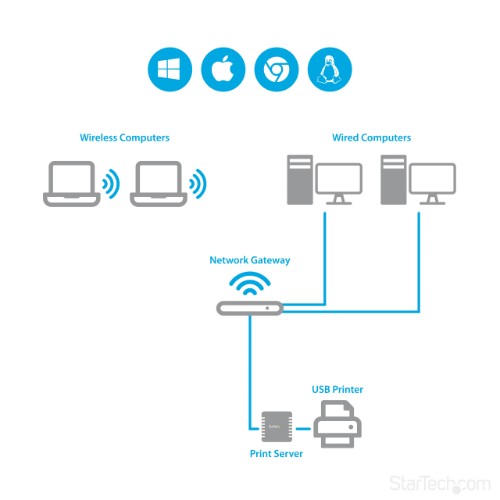
With web-based management, you can set up and monitor the printer server through a web browser, so you can place your printer at any convenient shared location - there’s no need to put your printer next to your computer. You can send print jobs to another user in your home or office, or even to a printer in another country.
Easy to use and install
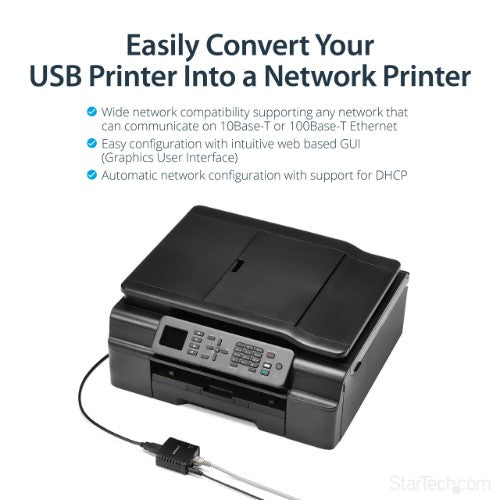
Compact and lightweight, the print server is easy to install with its straightforward installation wizards and remote web-based management. You simply use a USB cable to connect the print server to your printer’s USB port, then use an RJ45 networking cable to connect it to the rest of your network.
Supports LPR network printing and Bonjour Print Services
The printer server supports the Line Printer Remote (LPR) protocol which enables Internet printing. It also supports Bonjour Print Services, making it easier to find and configure printers on your network.
The PM1115U2 is backed by a StarTech.com 2-year warranty and free lifetime technical support.
Key Features
- Wired Network USB Print Server: Connect a single USB 2.0 printer to a wired Ethernet LAN (RJ45); 10Base-T, 100Base-TX auto-sensing to ensure a reliable connection, letting you print from any network computer, across the office or over the Internet
- Manual Network Setup Required: Configuration via web interface (static IP or DHCP) using LPR queue “LP1"; Not plug-and-play, requires intermediate network knowledge for installation; Access our online FAQs for additional helpful tips and instructions
- USB Printer Compatibility: Works with most USB 2.0 printers using standard drivers; Not compatible with USB hubs, multi-function printers with proprietary drivers, or printers requiring full bi-directional communication
- Compatibility: The USB to Ethernet print server is USB 2.0 compliant and works with macOS and Windows; It also supports LPR network printing and Bonjour Print Services for broad compatibility; Included software is compatible with Windows only
- Print from Anywhere: Print from any computer connected to the Ethernet; This print server doesn’t require a wired connection to a computer, however it must be connected to your networking device (eg. router or switch) with the included RJ45 network cable
Description
Share a standard USB printer with multiple users over an Ethernet networkThis palm-sized print server makes it easy to share a USB printer with users on your network. It’s the ideal solution for home or small office networks.
Reliable, cost-efficient network printing
Enjoy cost-efficient network printing for multiple users. The USB 10/100 Mbps print server lets you share one USB printer with multiple users on your network, instead of having to buy separate printers for each individual workstation.
Place your shared printer in a convenient location
With web-based management, you can set up and monitor the printer server through a web browser, so you can place your printer at any convenient shared location - there’s no need to put your printer next to your computer. You can send print jobs to another user in your home or office, or even to a printer in another country.
Easy to use and install
Compact and lightweight, the print server is easy to install with its straightforward installation wizards and remote web-based management. You simply use a USB cable to connect the print server to your printer’s USB port, then use an RJ45 networking cable to connect it to the rest of your network.
Supports LPR network printing and Bonjour Print Services
The printer server supports the Line Printer Remote (LPR) protocol which enables Internet printing. It also supports Bonjour Print Services, making it easier to find and configure printers on your network.
The PM1115U2 is backed by a StarTech.com 2-year warranty and free lifetime technical support.
Specifications
| Features | |
|---|---|
| Chipset | EST2862B |
| Internal | No |
| Product colour | Black |
| Built-in display | No |
| LED indicators | Activity, Link, Power |
| Power LED | Yes |
| Network | |
| Networking standards | IEEE 802.3, IEEE 802.3u |
| Ethernet LAN data rates | 10,100 Mbit/s |
| Copper ethernet cabling technology | 10BASE-T, 100BASE-TX |
| Network connection type | Ethernet LAN |
| Protocols | |
| Supported network protocols | LPR |
| Web-based management | Yes |
| Ports & interfaces | |
| Ethernet LAN (RJ-45) ports | 1 |
| USB 2.0 ports quantity | 1 |
| Parallel ports quantity | 0 |
| Serial ports quantity | 0 |
| DC-in jack | Yes |
| Technical details | |
| Chipset | EST2862B |
| Internal | No |
| Product colour | Black |
| Built-in display | No |
| Compliance certificates | RoHS |
| Power | |
| Input current | 0.3 A |
| External power adapter | No |
| Software | |
| Windows operating systems supported | Windows 7 Enterprise, Windows 7 Enterprise x64, Windows 7 Home Basic, Windows 7 Home Basic x64, Windows 7 Home Premium, Windows 7 Home Premium x64, Windows 7 Professional, Windows 7 Professional x64, Windows 7 Starter, Windows 7 Starter x64, Windows 7 Ultimate, Windows 7 Ultimate x64, Windows 8, Windows 8 Enterprise, Windows 8 Enterprise x64, Windows 8 Pro, Windows 8 Pro x64, Windows 8 x64, Windows RT, Windows XP Home, Windows XP Home x64, Windows XP Professional, Windows XP Professional x64 |
| Mac operating systems supported | Mac OS X 10.0 Cheetah, Mac OS X 10.1 Puma, Mac OS X 10.10 Yosemite, Mac OS X 10.2 Jaguar, Mac OS X 10.3 Panther, Mac OS X 10.4 Tiger, Mac OS X 10.5 Leopard, Mac OS X 10.6 Snow Leopard, Mac OS X 10.7 Lion, Mac OS X 10.8 Mountain Lion, Mac OS X 10.9 Mavericks |
| Certificates | |
| Certification | CE, FCC |
| Weight & dimensions | |
| Width | 52 mm |
| Height | 25 mm |
| Depth | 55 mm |
| Weight | 60 g |
| Packaging data | |
| Package width | 151 mm |
| Package height | 54 mm |
| Package depth | 218 mm |
| Package weight | 326 g |
| Package dimensions (WxDxH) | 140 x 210 x 53 mm |
| Indication | |
| LED indicators | Activity, Link, Power |
| Power LED | Yes |
| Packaging content | |
| Cables included | LAN (RJ-45) |
| User guide | Yes |
| External power adapter | No |
| Operational conditions | |
| Operating relative humidity (H-H) | 10 - 90% |
| Storage temperature (T-T) | 0 - 40 °C |
| Other features | |
| Package width | 151 mm |
| Package height | 54 mm |
| Package depth | 218 mm |
| Chipset | EST2862B |
| Data transfer rate | 100 Mbit/s |
| Logistics data | |
| Master (outer) case width | 456 mm |
| Master (outer) case length | 328 mm |
| Master (outer) case height | 288 mm |
| Products per master (outer) case | 20 pc(s) |